


Description
Download High Quality Photo Resizer – photo resizer, image resize tool, resize photos, image converter, resize image, resize picture, photo editing, image editing, photo utility, image utility
Overview
High Quality Photo Resizer is a focused utility designed to simplify the process of adjusting image dimensions, quality, and file formats. The app targets users who frequently manage digital images and require a fast, reliable solution for resizing and converting photos without compromising visual fidelity. Whether preparing images for web use, social media, email, or print, the tool streamlines workflows by enabling quick transformations in just a few seconds. Its core purpose is to eliminate the complexity often associated with image editing, particularly for users without advanced design experience.
Target users include photographers, content creators, students, and professionals who handle large volumes of images and need consistent output. The application supports batch processing, making it efficient for handling multiple files simultaneously—a key advantage for productivity workflows. While the developer, Jason K. Menard, is listed, no additional background information about the individual or their prior projects is available. The app operates on Windows, indicating it is tailored for desktop environments rather than mobile devices, despite the term “mobile app” in some keyword usage.
Real-world use cases include optimizing images for online platforms that have strict size and file size limits, converting between formats for compatibility with different software, and preparing visual assets for presentations or portfolios. In the broader app ecosystem, High Quality Photo Resizer fills a niche as a lightweight, no-frills tool that delivers core image manipulation functions without unnecessary bloat. It stands out by prioritizing speed, simplicity, and format versatility, offering a practical alternative to more complex editing suites.
Key Features & Functionality
- Quick Resizing: Enables users to resize one or multiple photos at once with minimal input. By specifying target dimensions and quality settings, users can process entire folders in a single operation, significantly reducing manual effort.
- Wide Format Support: Accepts a broad range of input formats, including BMP, GIF, JPG, and others, ensuring compatibility with diverse image sources and legacy files.
- User-Friendly Interface: Features a clean, straightforward layout that allows users to browse folders, preview images, and apply changes with just a few clicks, minimizing the learning curve.
- Format Conversion: Functions as a multi-format converter, allowing output in PNG, BMP, GIF, and other common formats, which enhances interoperability across devices and platforms.
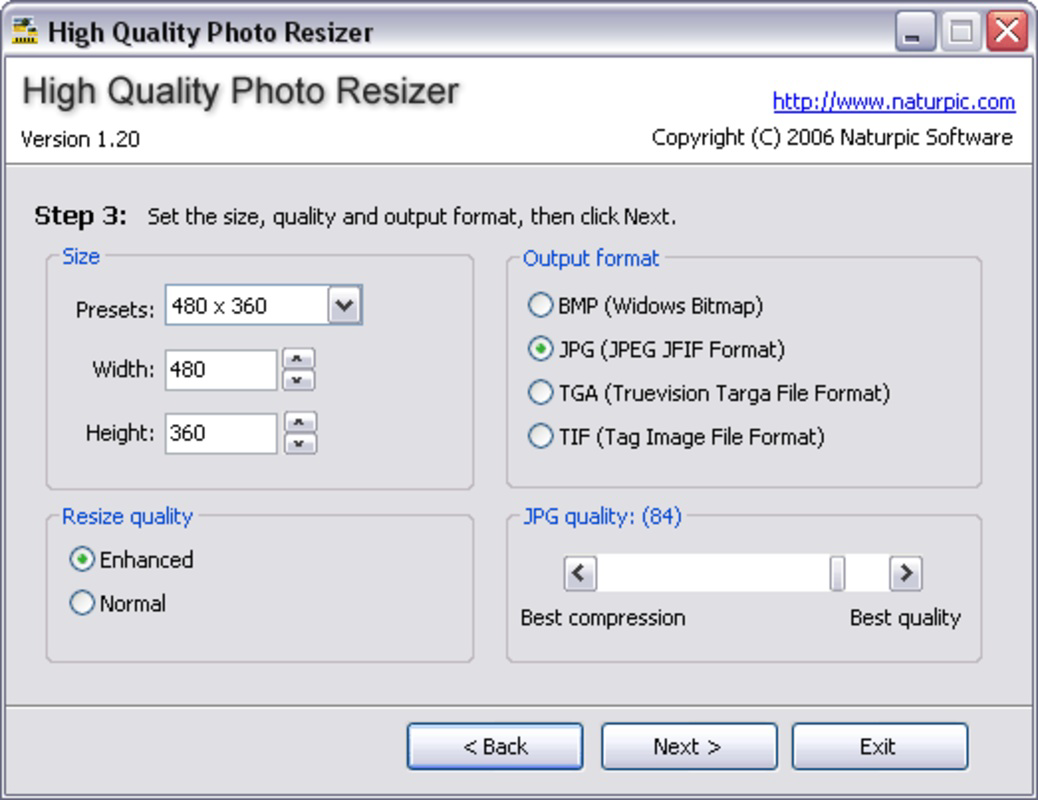
- Customizable Settings: Offers granular control over output size, compression quality, and file format, enabling users to tailor results to specific needs such as web optimization or high-resolution printing.
For example, a social media manager could use the app to resize 50 promotional images to Instagram’s recommended dimensions while converting them to PNG for higher clarity. Similarly, a student preparing a digital portfolio might convert scanned documents from JPG to PNG to preserve sharpness. The app’s batch processing capability ensures that these tasks are completed efficiently, reducing time spent on repetitive edits.
Interface, UX & Performance
The interface of High Quality Photo Resizer is described as simple and streamlined, focusing on core functionality without visual clutter. Navigation is designed around file browsing and batch processing, allowing users to load images directly from folders and apply changes in a linear workflow. The layout prioritizes accessibility, with clearly labeled buttons for resizing, format conversion, and output settings.
Although the developer did not list formal performance metrics, the app’s ability to process multiple files quickly suggests efficient resource management. Users can expect responsive behavior on standard Windows systems, particularly those with modern processors and sufficient RAM. Stability appears to be a strength, as the tool handles various image types without reported crashes or data corruption.
Performance across different device categories is not explicitly detailed. However, given its file size of 12.3 MB and target platform of Windows, it is likely optimized for desktop environments rather than mobile. Responsiveness during file loading and processing appears consistent, with minimal lag even when handling larger image sets. The lack of advanced editing features indicates a focused design philosophy—prioritizing speed and reliability over complexity.
Platform Compatibility & Technical Requirements
High Quality Photo Resizer is designed for the Windows platform and is compatible with Windows operating systems. The software version is 2.1, with a file size of 12.3 MB, indicating a lightweight footprint that does not require significant system resources. This makes it suitable for older or lower-spec machines, though specific OS requirements such as Windows 7, 8, or 10 are not listed.
The developer did not specify minimum OS requirements, nor did they detail compatibility with newer Windows versions or hardware configurations. As such, users should verify system compatibility before installation. The app is distributed as a standalone executable, meaning no additional runtime environments or dependencies are required. This simplifies the installation process and reduces potential conflicts with other software.
Pros and Cons
- Lightweight design with minimal system impact
- Supports batch processing for multiple image files
- Wide range of input and output formats
- Simple interface suitable for non-technical users
- Fast resizing and conversion speeds
- Platform limited to Windows; no mobile or macOS support
- Specific system requirements not disclosed
- Limited to resizing and format conversion—no advanced editing tools
- Price point of $2.99 may be considered high for a utility with no cloud integration
- No in-app updates or automatic version checks
FAQ
Is High Quality Photo Resizer available for mobile devices?
The app is designed for Windows and does not support mobile platforms such as Android or iOS. Users seeking mobile alternatives should explore dedicated mobile image tools.
Can I resize multiple photos at once?
Yes, the application supports batch resizing, allowing users to process multiple images simultaneously with a single set of settings.
What file formats does the app support?
High Quality Photo Resizer supports a variety of input formats including BMP, GIF, JPG, and others. Output formats include PNG, BMP, GIF, and additional common types.
Is the app secure to download and install?
As a standalone Windows executable, the app does not require internet access during operation. However, users should download it from trusted sources to avoid potential malware.
Does the app offer automatic updates?
The developer did not specify an update mechanism. Users are advised to manually check for new versions on the official release page.
Final Thoughts
High Quality Photo Resizer delivers a focused, efficient solution for users who need to resize and convert images quickly and reliably. Its lightweight design, broad format support, and batch processing capabilities make it a valuable tool for anyone managing digital images on Windows. While it lacks advanced editing features and mobile availability, its simplicity and speed compensate for these limitations.
Those who frequently prepare images for web, social media, or print will benefit most from its straightforward workflow and consistent output quality. The app’s value proposition lies in its ability to handle common image tasks without the overhead of full-featured editing software. For users seeking a no-nonsense utility that gets the job done, High Quality Photo Resizer is a solid choice.
Download High Quality Photo Resizer now
Guides & Tutorials for High Quality Photo Resizer
How to install High Quality Photo Resizer
- Click the Preview / Download button above.
- Once redirected, accept the terms and click Install.
- Wait for the High Quality Photo Resizer download to finish on your device.
How to use High Quality Photo Resizer
This software is primarily used for its core features described above. Open the app after installation to explore its capabilities.
User Reviews for High Quality Photo Resizer 0
No reviews found


